Write it by hand. Find it later.
In Kindred Contact, you can write your meeting notes on iPad with Apple Pencil, the way you would on paper. When you’re done, Kindred reads your handwriting into text on your device and keeps the page with the person and the meeting, so it’s there before you meet again.
Writing by hand keeps your eyes on the person across the table, not on a keyboard.
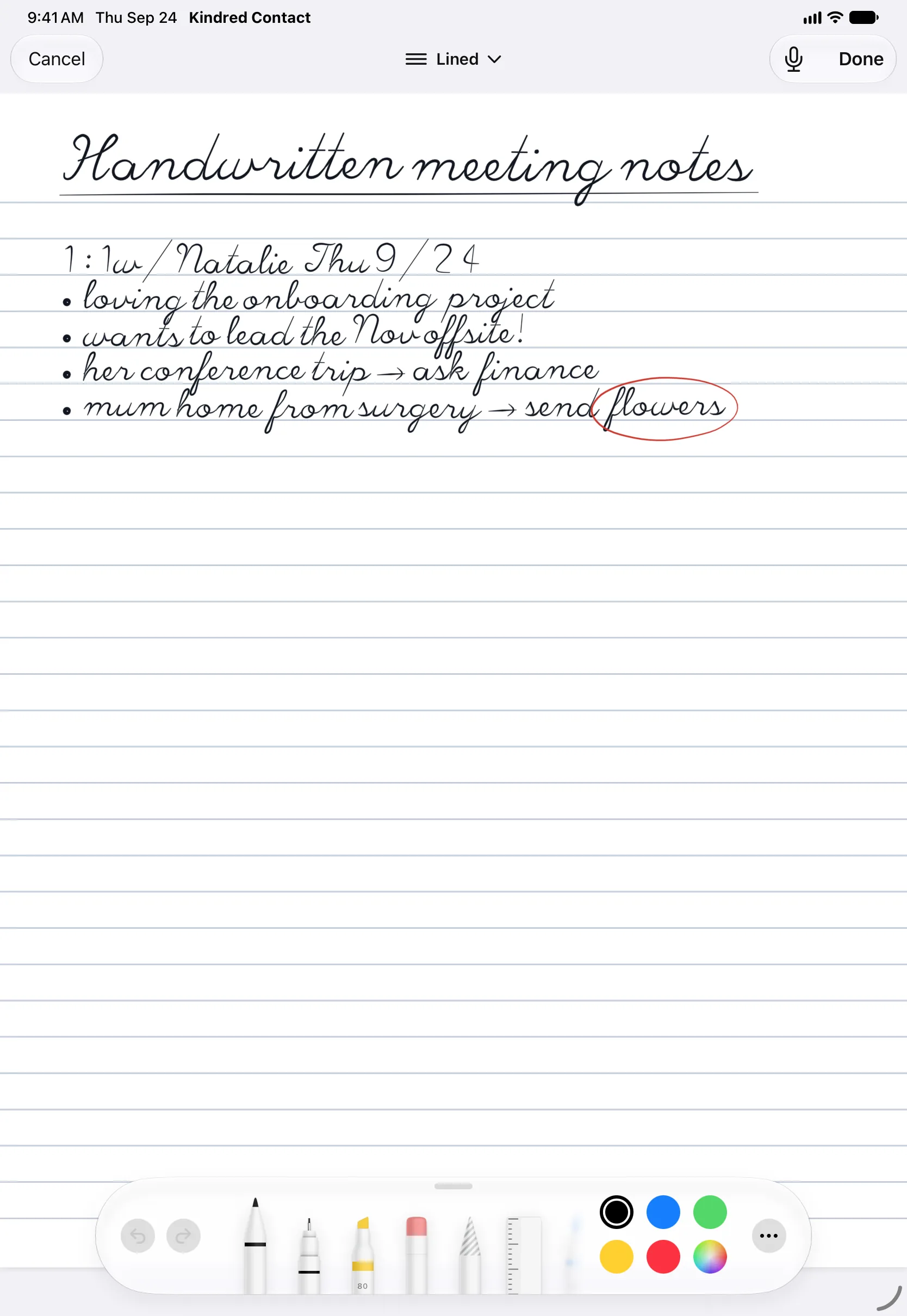
Your handwriting, read for you.
Write
Tap Handwrite in a meeting's notes and write on blank, lined, grid, or dotted paper with Apple's own pens. The page grows as you write.
Read on your device
Tap Done and Kindred reads your handwriting into your notes, line by line, ready to correct. Nothing leaves your device to do it.
Kept with them
The page stays with the meeting and everyone who was there. Reopen it any time to keep writing.
No Apple Pencil? On iPhone, write with your finger. Reading handwriting doesn’t need Apple Intelligence.
Read better the more you write.
Kindred reads your handwriting with what you write in mind: the names of your people and the words you use. With Apple Intelligence, other misread words are fixed on your device as the page goes in, with Undo.
Learns from your corrections
Correct a misread word twice and it's read right from then on, on every device.
Knows your people
A name that comes back a letter off is read as the person you were with, and the words you use in your notes aren't treated as mistakes.
Kept as you write
Your page is saved as you go, so it's still there if Siri comes up or the app closes.
A squeeze to start
Squeeze Apple Pencil Pro to start a new note, or write beside the person's page with the screen split in two.
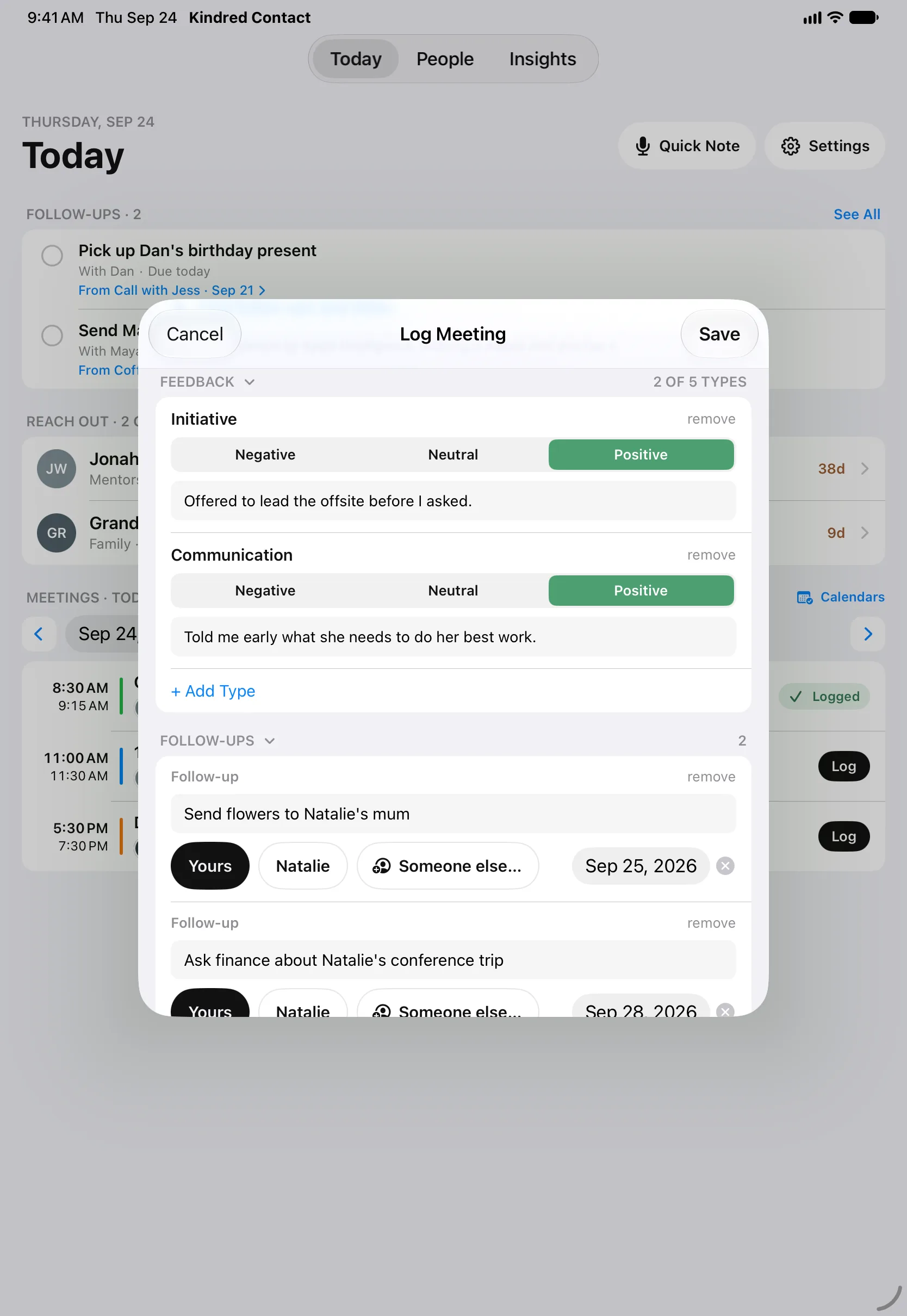
Notes that come back when you need them.
A notebook app keeps pages in order of when you wrote them. Kindred keeps them with the person: open someone’s page and every conversation is there, handwritten or typed, with the follow-ups still open.
- The text read from your page goes into your notes, and notes are searchable, so a name or a promise is easy to find months later.
- Add “send the deck by Friday” as a follow-up, and you’ll see it until it’s done.
- Before your next meeting, Today brings back what you talked about last time.
Scan the page from your notebook.
Wrote it in a paper notebook? Tap Scan and photograph the page with your iPhone or iPad. Kindred reads the text on your device, then keeps the page, puts the text in your notes, or both.
Photos work too, like a whiteboard after a workshop. Every page syncs to your other devices through your own iCloud, and nothing is sent to us.
Questions about handwritten notes
Can I take handwritten meeting notes on iPad and turn them into text?
Yes. In Kindred, tap Handwrite in a meeting's notes and write with Apple Pencil. When you tap Done, Kindred reads your handwriting into text in your notes, ready to correct, and keeps the handwritten page too.
Is my handwriting sent to a server to be read?
No. Kindred reads handwriting on your device with Apple's built-in text recognition. Your pages are kept on your devices and in your own private iCloud database.
Do I need Apple Intelligence for handwriting?
No. Reading handwriting works on any iPad or iPhone that runs Kindred. Apple Intelligence is only needed for summaries, briefs, and drafted messages. With it, Kindred also fixes other misread words on your device as the page goes in, with Undo. (Coming in Kindred 1.2.)
Can I write on iPhone?
Yes, with your finger. Apple Pencil on iPad is the most natural way to write, but the same pages work on iPhone.
Can I scan notes I wrote on paper?
Yes. Tap Scan to photograph a page with your camera, or pick a photo. Kindred reads the text on your device, and you choose whether to keep the page, put the text in your notes, or both.
Does Kindred learn my handwriting?
Yes. Correct a misread word twice and Kindred reads it right from then on, on every device; you can see what it has learned in Settings › Handwriting. It also knows the names of your people and the words you use in your notes. (Coming in Kindred 1.2.)
Can I edit a handwritten page later?
Yes. Kindred keeps the ink, so you can reopen a page and keep writing. Only the new lines are added to your notes.
How much does it cost?
It's free to download and free for 14 days. Then one purchase of $29.99 unlocks Kindred on your iPhone, iPad, Mac, and Apple Watch, with Family Sharing. No subscription.
Bring your Pencil to the next meeting.
Write the way you always have, and let Kindred remember where you put it.